

Installable Mobile App (PWA)
Pilot can make your storefront installable as a home-screen app on both iOS and Android. Shoppers tap your icon and the store opens fullscreen — no browser bars, no app store review, no separate mobile codebase. Everything is configured from theme settings and branded per store.Available in Pilot from version 2026.7+. The feature is off by default — enabling it is always an explicit choice.
For Merchants
Enable the app
- Open your project in Weaverse Studio.
-
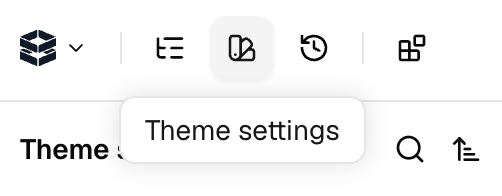
Go to Theme settings in the top bar → Mobile app (PWA).
-
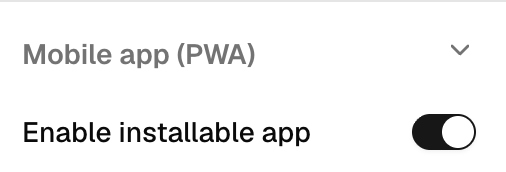
Scroll down and turn on Enable installable app.
- Fill in the settings:
- Publish. That’s it.
How shoppers install it
-
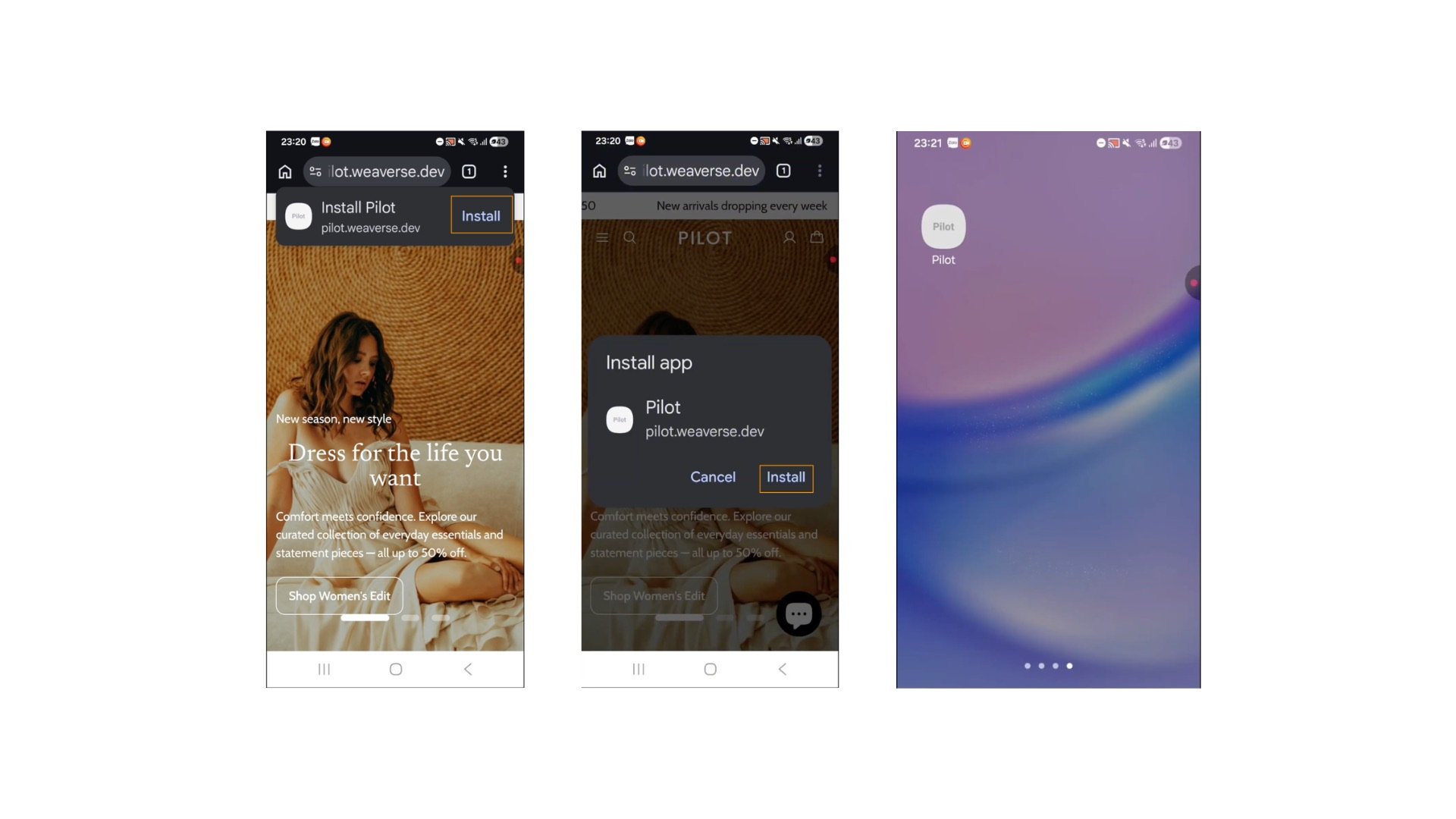
Android (Chrome): Chrome automatically shows an Install app prompt (or menu → Add to Home screen). The store opens as a standalone fullscreen app afterward.
-
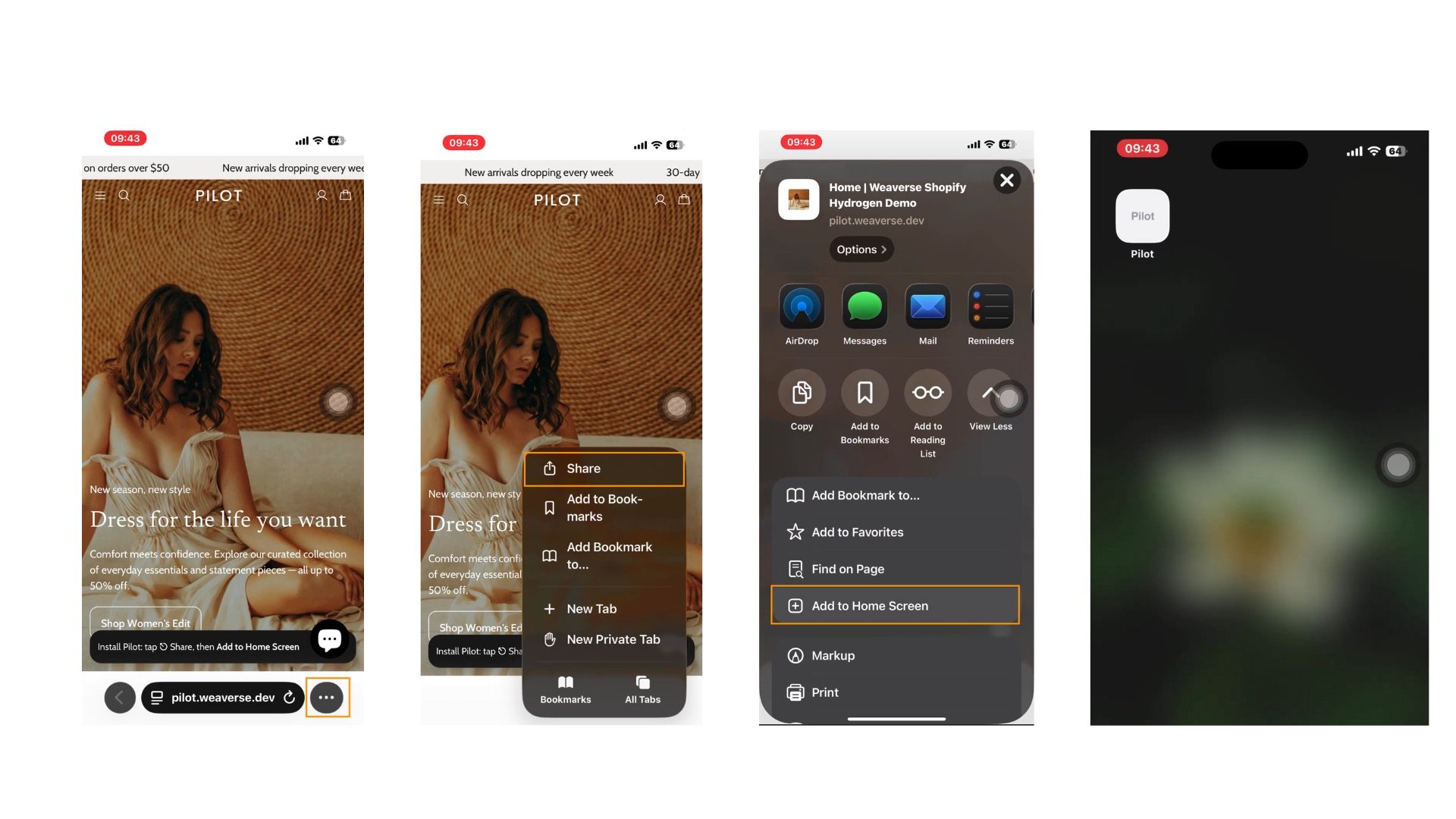
iOS (Safari): Apple never prompts on its own. Shoppers tap Share → Add to Home Screen. Because most people don’t know this, Pilot shows a small one-time dismissible hint banner to iPhone visitors (you can turn it off).
What it is — and isn’t
- ✅ Real home-screen icon, fullscreen launch, your branding, instant updates on every deploy.
- ✅ Checkout works exactly as before — nothing about carts, pricing, or checkout is ever cached or altered.
- ❌ Not an App Store / Play Store listing (no review process — that’s the point).
- ❌ Push notifications are not part of this feature yet.
For Developers
The implementation lives entirely in the Pilot theme — four pieces, all driven by theMobile app (PWA) settings group:
Web app manifest — app/routes/pwa/manifest.webmanifest.ts
A resource route (registered top-level in app/routes.ts, outside the :locale? prefix, like robots.txt). It reads context.weaverse.loadThemeSettings() plus a small shop query, and generates the manifest per merchant:
name/short_namefall back to the Shopify shop name- icons fall back to the Shopify brand logo; sizes (192/512/maskable) are produced with Shopify CDN params (
width,height,crop=center) - returns 404 when the feature is disabled, and caches for 1 hour
Head tags — app/root.tsx
Rendered only when the feature is on: the manifest <link>, theme-color, apple-touch-icon (iOS ignores manifest icons), and standalone meta tags. The service worker registration is a nonce’d inline script; when the toggle is off it actively unregisters Pilot’s worker — and only Pilot’s, never third-party workers.
Service worker — public/sw.js
Deliberately minimal and whitelist-only:
- cache-first for hashed
/assets/*build files (immutable) - stale-while-revalidate for
cdn.shopify.comimages, capped at 60 entries - everything else — HTML documents,
/cart,/account,/api/*, checkout — is never intercepted. Pilot’s SSR documents are intentionally anonymous so Oxygen can full-page cache them; the service worker preserves that design, so personalized or price-sensitive responses can never end up in a cache. - cache cleanup only touches
pilot-pwa-*caches, so it can’t break other software on the origin
If you customize
sw.js, keep the whitelist approach. Adding HTML caching to an e-commerce storefront is how carts get stale and prices display wrong.iOS install hint — app/components/pwa-install-hint.tsx
A small client-only banner shown once to iOS Safari visitors (including modern iPadOS, which reports a Mac user agent). Dismissal persists in localStorage, with all storage access guarded so restricted browsing contexts can never break the layout.
Extending it
- Custom install UI on Android: listen for
beforeinstallpromptand callprompt()from your own button. - Push notifications: the service worker is the future mounting point, but pushes need a backend to store subscriptions and send messages — treat that as a platform feature, not a theme tweak.
- The full design rationale lives in the Pilot repo at
.weaverse/docs/pwa-spec.md.